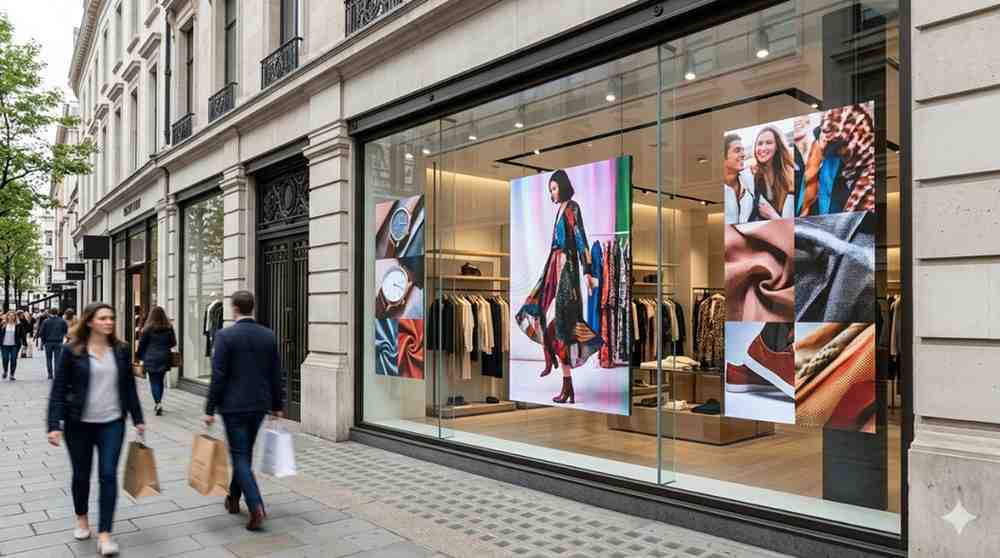
This guide covers everything you need to know, from how the technology works to what you genuinely need to think about before buying. No fluff, no sales pitch.
What Is Digital Window Signage?
Digital window signage refers to high-brightness display screens installed behind or within a shop window, specifically designed to be visible from the street outside. These aren't standard screens pulled from a back room. They're purpose-built displays engineered to push through the reflections, glare, and direct sunlight that would make a regular screen completely invisible from the pavement.
The basic principle is straightforward. You mount a high-brightness screen facing outward from behind your glass, connect it to a content management system, and your window becomes a dynamic, fully programmable communication surface that can show video, animation, live offers, or brand content around the clock.
What makes this different from traditional window displays is the ability to change everything instantly. No reprinting. No waiting for a designer to produce new artwork and a print shop to deliver it. You update the content from your phone or laptop and it's live within minutes.
Why Businesses Are Making the Switch to Digital Window Signage
Walk down any major retail strip in Sydney, Melbourne, or Brisbane and you'll see it happening. The printed poster is being replaced. Not because businesses are following a trend, but because the practical advantages are hard to argue with once you've experienced them firsthand.
The Visibility Problem with Static Displays
A printed poster is designed for one piece of content at one moment in time. The moment it goes up, it starts becoming less relevant. Seasonal offer from three weeks ago? Still in the window. Product that sold out days back? Still being promoted. That's not a communication failure, it's a system failure.
Digital window signage eliminates that problem. Content can be scheduled, rotated, updated, and retired automatically. You can run your morning coffee special during the breakfast hour and switch to your lunch promotion at midday without touching the window.
The Attention Gap
Static displays are invisible to frequent passersby within days of going up. The human brain filters out anything it has processed before. Movement and changing content reset that filter.
According to a retail signage study by the Digital Signage Federation, dynamic digital displays capture attention up to five times more effectively than static signage among repeat passersby. That's not a marginal improvement. For a business in a high foot traffic location, it's a significant commercial advantage.
In my experience, businesses that switch from printed window displays to digital almost universally report a noticeable increase in people stopping to look at the window, particularly during the first few weeks when the novelty effect is strongest. But the sustained attention benefit continues well beyond that initial period because the content keeps changing.
Understanding High Brightness: The Core Technical Requirement
This is the part that separates genuinely effective digital window signage from a disappointing purchase.
Standard commercial displays operate at around 350 to 500 nits of brightness. That's perfectly adequate for a reception area or indoor retail floor where ambient light is controlled. Put that same screen behind a shop window facing direct or indirect sunlight and the image becomes washed out, difficult to read, and in bright conditions, essentially invisible from outside.
Window-facing digital signage requires a minimum of 2,500 nits for shaded window positions and 4,000 nits or more for windows that receive any direct sunlight at any point during the day. Premium window signage displays go up to 5,000 nits or higher.
This is not a specification to compromise on. When I tried placing a 700-nit display behind a west-facing window as a test, the content was completely unreadable from the street in afternoon light. The screen was technically on and functioning. It was just invisible where it needed to be seen.
Anti-reflective and anti-glare glass treatment is a related consideration. Even a very bright screen can be undermined by heavy surface reflections on the glass in front of it. Many professional window signage installations include a treatment on the window glass itself to reduce this effect.
Types of Digital Window Signage Displays
High Brightness LCD Panels
The most common format for retail window signage. These are flat-panel LCD screens with specialist LED backlighting that drives brightness to window-ready levels. They're available in a wide range of sizes, support full HD and 4K resolution, and connect to standard content management platforms.
They're typically the most cost-accessible entry point for businesses setting up window signage for the first time and deliver excellent image quality for text, graphics, and video content.
Transparent LED Displays
Transparent LED displays are one of the most visually striking applications of digital window signage technology. The display is constructed with spacing between LED modules that allows viewers to partially see through the screen while content plays across it.
The effect from the street is genuinely arresting. Content appears to float in the window space, layered over whatever is behind the glass. For luxury retail, automotive showrooms, and brand environments where visual impact is a key objective, transparent LED is increasingly the format of choice.
Transparency ratings typically range from 70% to 95%, depending on the pixel pitch and module density. Higher transparency means a lower overall pixel count and therefore lower resolution at close viewing distances, so the trade-off between transparency and image quality needs to be weighed against your specific content requirements.
LED Poster Displays
Slim, freestanding LED poster displays have become popular for smaller retail spaces, real estate offices, travel agencies, and hospitality venues. They stand in the window like a traditional A-frame or poster display but show dynamic content with high brightness.
They're portable, don't require permanent mounting, and can be repositioned easily. For businesses that rent their premises or need flexibility, LED poster displays offer a practical entry into digital window signage without permanent installation requirements.
Double-Sided Window Displays
Some window signage configurations are designed to communicate in both directions simultaneously: outward to the street and inward to customers already inside the store. Double-sided displays maximise the utility of the window space by serving both audiences with content tailored to each.
What Content Works Best in a Digital Window Display
The technology is only as effective as the content running on it. This is where a lot of businesses underinvest in time and thought.
Street-facing content operates in a fundamentally different context from indoor signage. Viewers are passing at walking pace or viewing from across the street. You have two to four seconds to communicate a message before they've moved on.
Content principles that work for window signage:
- Keep text minimal. Three to five words maximum per frame if you want it to be read at walking pace
- Use high contrast colour combinations. Bright text on dark backgrounds or dark text on white backgrounds outperforms subtle design choices in outdoor light conditions
- Motion attracts attention but should serve the message, not distract from it
- Show the most important information first, not last
- Design for the screen size and aspect ratio you're actually using, not for a standard monitor
- Schedule content to match the time of day. Morning commuters, lunchtime foot traffic, and evening pedestrians have different contexts and different dwell times
I've noticed that businesses with the most effective window signage treat it like a billboard, not like an internal screen. The design constraints are different, and respecting those constraints makes a significant difference to real-world impact.
Installation Planning for Digital Window Signage
Getting the installation right determines whether the technology delivers on its potential. These are the variables that need to be resolved before hardware arrives on-site.
Window orientation and sun exposure: Which direction does the window face? Does it receive direct sun at any point during the day, and at what times? This directly determines the minimum brightness specification required.
Available mounting space: Is the window deep enough for a rear-mounted panel, or does the display need to be surface-mounted against the glass? The mounting approach affects both the hardware selection and the installation method.
Glass type and condition: Single or double-glazed? Tinted, frosted, or clear? Existing glass treatments affect visibility and may need to be addressed before installation. A low-emissivity or heavily tinted pane can reduce the visible output of even a high-brightness screen.
Power access: Where is the nearest power point to the window? How will the cable be routed neatly within the retail space?
Network connectivity: Cloud-based content management requires reliable internet connectivity at the installation point. Is there a network connection or Wi-Fi coverage close to the window location?
Heat management: High-brightness screens generate heat. In a sealed window alcove or a small enclosed space, adequate ventilation needs to be planned to prevent the display from overheating, particularly in summer months.
The team at Digital Harbor works through each of these installation variables with clients before any hardware is specified or ordered, because getting these details right upfront determines the quality of the outcome far more than the brand of screen chosen.
Managing Content on Your Digital Window Signage
A display without a clear content management process becomes an expensive static poster. The whole point of digital window signage is the ability to keep content current, relevant, and engaging.
Most commercial window signage displays connect to a cloud-based content management system (CMS) that allows you to:
- Upload and organise your media library of images, videos, and animated graphics
- Schedule content to play at specific times of day or on specific dates
- Create playlists that rotate through multiple pieces of content automatically
- Push content updates remotely from any device with internet access
- Manage multiple screens across different locations from a single dashboard
For small businesses managing one or two screens, a simple CMS with an intuitive interface is the priority. For businesses managing screens across multiple locations, a more powerful platform with centralised management, user permissions, and reporting capabilities becomes important.
Digital Harbor recommends choosing hardware and CMS together rather than separately, to ensure compatibility and avoid the frustration of discovering that your chosen software doesn't fully support your display hardware after purchase.
Common Mistakes to Avoid with Digital Window Signage
Buying insufficient brightness: This is the most common and most costly mistake. Always specify brightness based on your worst-case sun exposure scenario, not your average conditions.
Using indoor-rated screens: Standard commercial displays are not designed for window-facing applications. Even if they work initially, the sustained brightness demand will degrade them prematurely.
Neglecting glass treatment: Anti-reflective glass treatment is often the difference between good and great window signage visibility and is frequently overlooked in budget-conscious installations.
Designing content for indoor viewing: Window signage content needs to be designed specifically for the outdoor viewing context. Content that looks great on a monitor in the office will often fail on a window-facing screen in practice.
Ignoring heat management: High-brightness displays in enclosed window spaces need proper ventilation. Overheating is a leading cause of premature display failure in window signage applications.
Forgetting to update content regularly: Digital signage that shows the same content week after week loses its attention advantage over static displays. Building a regular content refresh cadence into your operations is as important as the installation itself.
The key is getting the specification right, planning the installation properly, and treating the content as an ongoing commitment rather than a set-and-forget task. That combination is what separates window signage that genuinely drives results from a very expensive static poster.