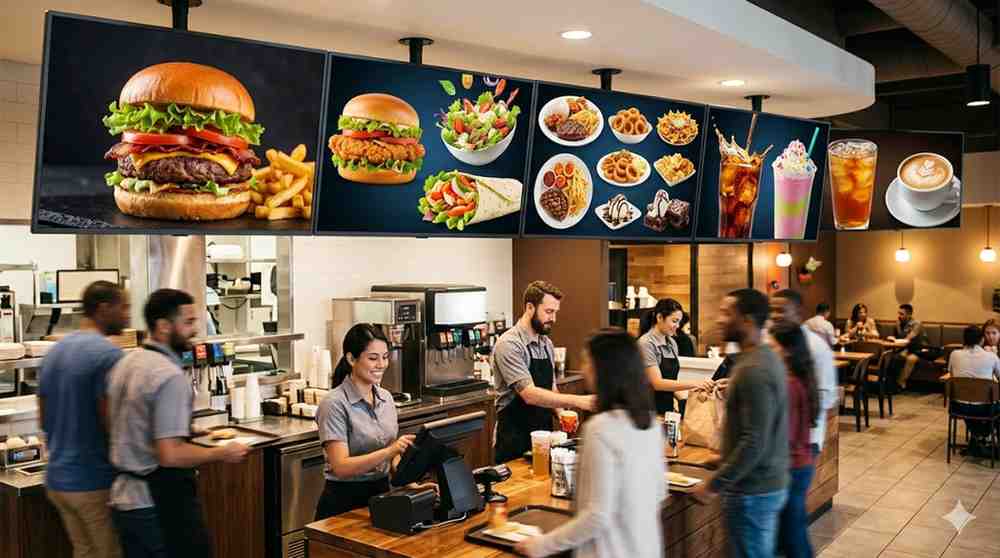
Digital menu screens solve that problem completely, and they do it in ways that go well beyond simply looking better than a blackboard.
This guide covers everything you need to know, from choosing the right screen for your environment, to managing content without needing a design degree, to the real operational benefits that hospitality operators consistently report after making the switch.
What Are Digital Menu Screens?
Digital menu screens are commercial-grade display screens used in food service and hospitality environments to present menus, promotions, daily specials, and brand content to customers. They replace printed, written, or static displayed menus with dynamic, fully programmable digital content that can be updated instantly from any connected device.
The technology spans a wide range of formats. A single screen above a café counter. A row of three landscape panels above a fast food service counter. A portrait-orientation display beside a grab-and-go refrigerator. An outdoor screen facing the street with high brightness to push through direct sunlight. A full video wall behind a bar showcasing cocktail promotions and brand content.
What all of these formats share is the core capability that makes digital menu screens genuinely transformative for hospitality: the ability to change what's on the screen without touching the screen itself.
Why Hospitality Businesses Are Making the Switch
The Printed Menu Problem
Printed menus have a fundamental flaw. The moment they are produced, they start becoming outdated. A dish sells out. A supplier changes. Prices need adjusting. A seasonal item needs to be added. Every one of those changes requires a reprint, which costs time, money, and often means running with inaccurate or outdated information while waiting for new materials to arrive.
I've noticed that hospitality operators who switch to digital menu screens almost universally describe the same moment of realisation: the first time they needed to update a price or remove a sold-out item and did it in under two minutes from their phone, without interrupting service, without waiting for anything to be reprinted, and without anyone behind the counter needing to do anything. That moment tends to convert sceptics instantly.
The Upselling Opportunity
Digital menu screens are not just a more convenient way to display a static menu. They are an active sales tool when used effectively.
Dynamic content can highlight high-margin items visually in ways that printed menus cannot. An animated hero image of your signature dish, a time-limited promotion that counts down in real time, a rotating display that showcases your top sellers with compelling photography, these are all standard capabilities of a well-configured digital menu system.
A study by QSR Magazine found that restaurants using digital menu boards with dynamic content experienced an average increase in upsell conversion of around 3 to 5 percent compared to static menu formats. In a high-volume hospitality environment, that percentage translates to meaningful additional revenue over the course of a year.
Time-of-Day Menu Automation
One of the most practically useful features of digital menu screens is the ability to schedule different menus for different times of day automatically. A café that serves breakfast, lunch, and all-day coffee and snack options can program the screen to switch between these menus at preset times without any manual intervention.
The breakfast menu runs from opening until 11am. It switches to the lunch menu automatically. The afternoon snack and coffee focus kicks in at 2pm. The whole day runs itself from a content perspective, without any staff involvement in the menu changeover.
For multi-location hospitality businesses, this scheduling can be managed centrally across every site simultaneously from a single content management dashboard.
Types of Digital Menu Screens
Counter-Mounted and Wall-Mounted Displays
The most common configuration for cafés, quick service restaurants, and food courts. One to three landscape-orientation commercial displays mounted above the service counter, showing the full menu in clearly organised sections with high-quality food photography and pricing.
Screen size for counter-mounted menu displays should be determined by the viewing distance from the ordering position to the screen and the amount of menu content that needs to be displayed simultaneously. A compact café counter with close viewing distance can work effectively with a single 43-inch display. A wide fast food service counter with a longer viewing distance and a more extensive menu may need three 55-inch or 65-inch panels.
Portrait-Orientation Displays
Portrait format digital menu screens are increasingly popular for narrower counter environments, single-item or category-focused displays, and locations where a tall vertical format works better with the architectural space than a wide horizontal layout.
Portrait displays work particularly well for specials boards, beverage menus, grab-and-go selections, and promotional content positioned at eye level at the point of decision rather than above the counter.
Outdoor-Facing Menu Screens
Outdoor digital menu screens are used for drive-through ordering lanes, outdoor dining precinct menu boards, food truck and market stall applications, and street-facing displays for venues that want to draw customers in from the footpath.
These displays require the same outdoor-specification engineering as any outdoor digital display: high brightness for sunlight readability, IP65 or higher weatherproofing, and thermal management for operation across Australia's full seasonal temperature range. For a drive-through or outdoor ordering environment, brightness specifications of 2,500 nits minimum for shaded positions and 4,000 to 5,000 nits for direct sun exposure are the baseline requirements.
Self-Order Kiosk Screens
Self-order kiosks combine digital menu display with interactive touchscreen ordering capability. The customer browses the full menu on the screen, customises their order, and places it directly, without counter staff involvement in the order-taking process.
Kiosk screens have become a genuine operational tool rather than a novelty, particularly in quick service and fast casual restaurant environments where they reduce queue times, increase average order values through upsell prompting, and free counter staff to focus on food preparation and customer service rather than order entry.
In my experience, the hospitality operators who report the strongest results from self-order kiosks are those who invest time in configuring the upsell and modifier prompts thoughtfully, not just installing the hardware and hoping for the best. The system works when the menu architecture is designed for the self-order journey.
Video Wall Menu Displays
For larger venues, premium restaurants, or hospitality environments where visual impact is central to the brand experience, a video wall configuration behind or above the service area creates a dramatic focal point that combines menu information with brand content and atmospheric visuals.
Video wall menu displays are common in sports bars, high-end food halls, and restaurant concepts where the theatre of the kitchen or bar is part of the dining experience. Multi-zone content layouts allow different sections of the wall to show different content simultaneously, such as a live sports feed alongside the current food and drinks menu.
Choosing the Right Digital Menu Screen for Your Venue
Screen Size and Viewing Distance
The most common mistake hospitality operators make when selecting digital menu screens is choosing a screen size based on what looks impressive rather than what works for the specific viewing distance in their space.
A screen that is too small for the viewing distance makes menu items hard to read, frustrating customers and slowing the ordering process. A screen that is too large for a compact space can feel overwhelming and create layout challenges for the content.
The practical formula: for comfortable menu readability, every 10 centimetres of screen height supports approximately one metre of comfortable viewing distance. A 55-inch landscape display has a screen height of roughly 69 centimetres, making it comfortably readable from up to about 7 metres. For a typical café counter where customers are standing 1.5 to 3 metres from the screen, a 43-inch or 55-inch display is generally appropriate.
Commercial Grade Versus Consumer Screens
This distinction genuinely matters in a hospitality environment. A consumer television might seem like an attractive option based on upfront cost, but it is not built for the operating conditions of a commercial kitchen environment.
Commercial-grade digital menu screens are designed for continuous operation, typically 16 to 24 hours daily. They have better thermal management for the warm, humid conditions common behind a service counter. They support portrait orientation mounting without the internal cooling issues that consumer screens develop in vertical configurations. And their warranties reflect commercial use rather than a few hours of daily home viewing.
Running a consumer television as a menu display in a commercial kitchen environment will shorten its functional life significantly. The apparent saving at purchase disappears quickly when you're replacing the unit within 18 months.
Brightness Requirements
For counter-facing indoor menu displays, standard commercial brightness of 350 to 700 nits is generally adequate. For window-facing displays, counter positions that receive direct sunlight through glass at any point during the day, or outdoor applications, brightness specifications need to be much higher.
A common situation in Australian hospitality venues is a counter that faces a large north-facing window. In summer, direct sunlight hitting the service area from the front can make a standard brightness menu screen very difficult to read. Assessing the light conditions in your specific space at their worst, not their average, is essential before specifying screen brightness.
Content Management System Compatibility
The screen is only as useful as the software running behind it. Before choosing hardware, confirm that it is compatible with the content management system you intend to use, or that the hardware supplier can recommend and support a compatible platform.
Key CMS features to look for in a hospitality context include:
- Menu template library with food service-specific layouts that non-designers can use without professional help
- Scheduling tools for time-of-day and day-of-week menu automation
- Multi-screen management for venues running more than one display
- Real-time update capability for sold-out items, daily specials, and pricing changes
- Integration with point-of-sale systems for venues that want menu and pricing changes to sync automatically between the POS and the display
- Multi-location management for hospitality groups operating across more than one venue
Content Design for Digital Menu Screens
Great hardware running poor content is a wasted investment. Content design for digital menu screens is a specific discipline with its own rules, and understanding those rules is the difference between a screen that actively helps customers make decisions and one that confuses or overwhelms them.
Keep it readable at a glance: Customers at a counter are making decisions quickly, often with other people behind them. Large, clear typography is more important than creative font choices. Menu item names and prices need to be instantly legible from the ordering position without squinting.
Use photography strategically: High-quality food photography significantly increases appetite appeal and order conversion for featured items. But not every item needs a photograph. Selective use of food imagery to highlight hero products or high-margin items is more effective than cramming photography into every available space.
Limit the number of items per screen zone: A screen divided into too many small sections with too many items becomes difficult to navigate. Organise menu content into clear categories with adequate visual breathing room between sections.
Use colour purposefully: High contrast between text and background ensures readability across different lighting conditions. Brand colours can be used for section headers and highlights without compromising legibility.
Animate with intention: Subtle motion graphics and transitions add visual interest and draw the eye to featured items. Excessive animation creates visual noise that makes the screen harder to read and can feel chaotic in a busy service environment.
Update content regularly: A digital menu screen that shows the same content every day, every week, indefinitely, loses the engagement advantage of dynamic content. Seasonal updates, limited time offers, and regular content refreshes keep the screens working actively for your business.
Installation Planning for Digital Menu Screens
Getting the physical installation right is as important as choosing the right hardware and software. These are the practical considerations to work through before installation day.
Mounting position and height: The screen needs to be positioned at a height where it is clearly visible from the customer's eye level at the ordering position, without requiring customers to look uncomfortably upward. For counter-mounted displays, a mounting height of 1.8 to 2.2 metres to the bottom of the screen is generally the comfortable range, depending on the counter height and the space above it.
Glare and reflections: Assess the ambient lighting in the service area and identify any light sources that could create reflections on the screen surface. Overhead pendant lights positioned directly in front of a screen are a common source of glare that affects readability. Screen positioning, tilt, and in some cases anti-glare screen treatment can address this.
Power and cable management: Power cables and data connections need to be routed cleanly within the service area. Surface-mounted cables in a hospitality environment are both an aesthetic problem and a potential safety issue. Planning cable routes within wall cavities or through ceiling spaces before installation produces a professional result.
Ventilation in kitchen-adjacent locations: Commercial kitchen environments generate heat, steam, and airborne grease particles. Screens positioned close to cooking areas need adequate ventilation around the display and may benefit from an enclosure with a filtered air intake to protect internal components from grease contamination.
Network connectivity: Cloud-based CMS platforms require reliable internet connectivity at the display location. Hardwired ethernet is the most reliable option. Wi-Fi connectivity can work but is susceptible to interference in environments with dense wireless device populations.
The team at Digital Harbor assesses all of these installation variables during the site evaluation process, because an installation that works technically but creates practical problems in the service environment is not a successful outcome for the client.
Maintaining Digital Menu Screens
Hospitality environments are demanding for electronic hardware. Regular maintenance keeps your digital menu screens performing well and extends their operational life.
Daily: Wipe down the screen surface at the end of service with a soft, damp cloth to remove fingerprints, splashes, and airborne grease film. In kitchen-adjacent positions, this daily clean is genuinely important for both appearance and longevity.
Weekly: Check that all scheduled content is displaying correctly and that any time-of-day menu automations are functioning as expected. Confirm that sold-out items have been updated and that current specials and pricing are accurate.
Monthly: Inspect cable connections, ventilation clearances, and mounting fixings. Check for any dead pixels or brightness inconsistencies on the display surface. Review and update content to retire anything that is no longer current.
Quarterly: Firmware updates for the display and media player. Review of the full content schedule to ensure it accurately reflects the current menu, seasonal changes, and any promotional activity. Check and clean ventilation fans or filtered air intakes if present.
Annually: Professional inspection of internal components and power supply. Brightness calibration check. Structural inspection of mounting hardware.
Digital Harbor recommends establishing a service and maintenance agreement at the time of installation to ensure these checks are performed consistently rather than reactively after a problem occurs.
Digital menu screens represent one of the clearest and most direct investments a hospitality business can make in both operational efficiency and customer experience. The technology is mature, the content management tools are accessible, and the commercial benefits are well established across every segment of the food service industry.
Getting the specification right for your specific environment, planning the installation carefully, and committing to a content strategy that keeps the screens genuinely useful are what separate a digital menu system that pays for itself from one that simply replaces a blackboard with a more expensive blackboard.